Writing your own "print" function

It won't be a fully functioning printf function like the one from Glibc. it will only print a single argument and won't accepts arbitrary arguments. that's why I called it "print" instead of "printf" so no formatting is happening :)
I still remember when I was learning C language at my university I wanted to do everything by myself eg, making my own printf, scanf etc without relying on Glibc, at that time my professor told me to look at __asm__ extension provided by GCC ( it's also supported by Clang too ) however I didn't had enough skills to understand it. today I took some time and tried to understand how it works and it's actually very simple.
what do we need to know to write our own little print function?
- basic understanding of linux syscall ( I will only focus on linux but you can figure out how to do it in Windows or Mac )
- knowing how to write inline assembly and assembly in general.
What is a Syscall?
a system call (syscall) is the programmatic way in which a computer program requests a service from the operating system on which it is executed.
This line from wikipedia explains it quite well. it's basically saying that when you want to execute certain task you will ask the kernel to do that task for you. here are some example task you might ask the kernel to do:
- Opening a file/socket
- Reading/Writing to a file/socket
- Forking a process
there are ton of other task you can delegate to kernel. but these are the most used one. here is a list of what a modern Linux kernel can do for the running process:
How to write inline assembly?
In C language you can directly write assembly which will be included in the executable file created after compilation. which is really nice! we can write arbitrary assembly code inside a C function.
here is an example of a C function which adds two parameters and returns the result.
static int add(int a, int b)
{
  __asm__ volatile(
        "add %1, %0"
        : "=r"(b)
        : "r"(a), "0"(b)
        : "cc"
      );
  return b;
}
let's decipher what it's doing.
the __asm__ part tells the compiler that we are writing inline assembly. volatile keyword forbids the compiler from optimizing the written assembly as it could lead to Undefined Behavior.
"add %1, %0" is a assembly written in AT&T syntax. which tell the CPU to perform addition on %1 and %0 and store the result in %0. but what is %1 and %0 ? they are operands. you can see "=r"(b) after the first colon ( : ) the operands after the first colon are the output operands. so what does it do. the 'r' says that the first operand could be any general purpose register and the '=' before 'r' tells that that operand it write-only. the 'b' inside bracket means that whatever register you choose for operand %0 make sure to copy the output to 'b' variable. input operands starts after the second colon ( : ). "r"(a) is in the input operands which means that operand %1 can be any general purpose register however that register must be initialized by the value of 'a' variable before the inline assembly executes. now "0"(b) is tricky. the '0' inside quote means use the same register you choose for operand %0 and initialize it with the value of 'b' variable. now the last part "cc" means that this specific inline assembly cobbles Condition Code Flags ( cc stands for Condition Code ). you may also add any particular register which might get cobbled.
here is a screenshot of what the final assembly of add function looks like:

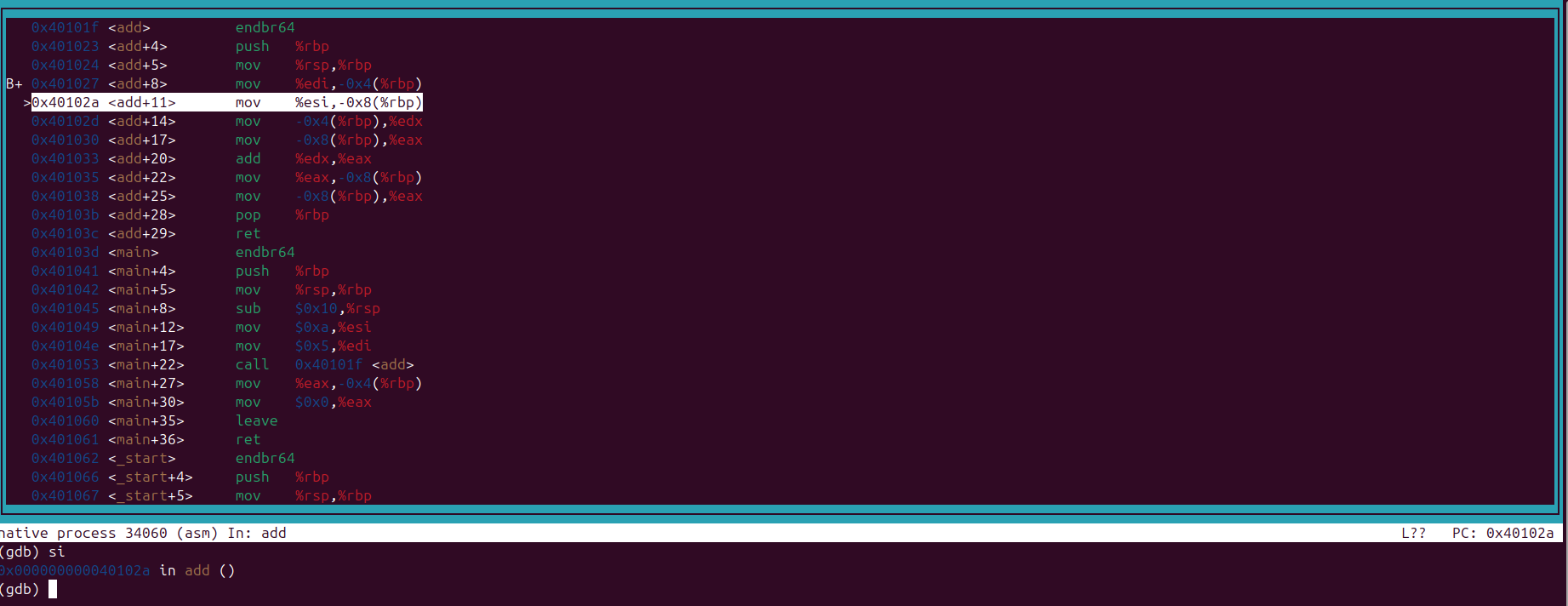
ignore the main and _start function. in the screenshot you can see that %edx and %eax are being initialized by the local variable. you might wonder that on add+22 and add+25 offset something redundant is happening. why it's that? can we optimize it? ( try it yourself )
this can be optimized in thousands of way which I won't be discussing in this blog.
Okay so now we know how to write inline assembly. we can start to implement our tiny print function.
void print(const char *str) {
  int len = 0;
  while(str[len]) len++; // counting the length of string
  __asm__ volatile(
    "mov $1, %%rax\n"
    "mov $1, %%rdi\n"
    "syscall\n"
    :
    : "S" (str),
      "d" (len)
    : "rcx", "r11", "memory"
  );
}
that's it! you got your own print function. now let me explain what it does. first it calculates the length of the string and saves it in len variable.
now there is lot of new things inside this inline assembly block which I haven't mentioned earlier.
- you can have multiple lines of assembly inside a single block ( make sure to add \n at the end )
- I only talked about the 'r' register type. which is used to specify a generic register however you can pick a specific register using 'S' ( for RSI ) or 'd' ( for RDX ).
"S" (str) will copy the address of str into register RSI. "d" (len) will copy the value of len into RDX register. so we don't have to worry about setting them :)
so yeah I guess this is it for my first blog, I will write more things about gdb and c in the future! can't promise though :p